
A Supabase mobile app for iOS and Android.

A Supabase dashboard built for a phone: check functions, find users, run SQL, fix rows and read logs on iPhone, iPad or Android.

Download on the App StoreGet it on Google Play

Independent client, not affiliated with or endorsed by Supabase Inc.

Supanator analytics on iPhone: HTTP requests, error rate, database size, active connections and cache hit ratio

Five everyday fixes, from your phone

The jobs that used to wait until you were back at a laptop, and how each one goes in Supanator. Every one works with Supabase Cloud and self-hosted projects.

Check a failing Edge Function

Open Edge Functions and pick the function from the list, where each one shows its version and status. Its logs show the failing invocations and the errors they returned. If the cause is a missing or wrong value, the Secrets tab next to the list holds your secrets and environment variables, so you can correct it there and invoke the function again to confirm.

Browsing functions is free. Logs are part of Pro.

Edge Functions in detail

Edge Functions list in Supanator with each function, its version and its status

Find a user

Open Auth and search the user list by email. Each entry shows how the user signs in, and opening it shows their details and sessions. You can also create and invite users there, and review the RLS policies that decide what a signed-in user can read.

Browsing users is free. Creating users and managing RLS policies are part of Pro.

Auth in detail

Auth users in Supanator with a search field and each user with the Email sign-in provider

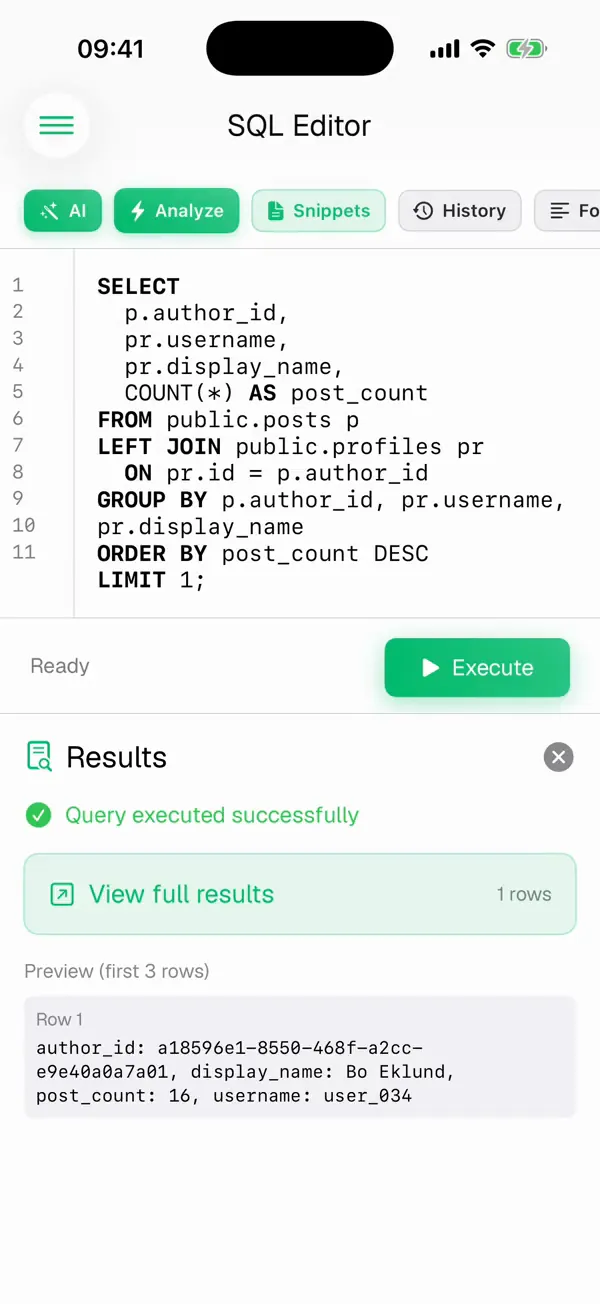
Run a query

Open the SQL editor, type the query or start from a saved snippet, and run it. The first rows appear under the editor with a status line, the full results view gives the result the whole screen, and CSV export sends it to a spreadsheet or a ticket. A destructive statement asks for confirmation before it reaches the database.

The SQL editor is free. Snippets are part of Pro.

The SQL editor in detail

SQL editor in Supanator after Execute: Query executed successfully, with the first result row

Put a row back

Open the table in the table editor and search for the row. Open it, correct the fields and save. The editor understands each column's type and constraints, and on iPad the extra width shows more columns at once, which helps with wide tables.

Browsing tables is free. Editing rows is part of Pro.

The table editor in detail

Close-up of the iPad table editor in Supanator: the body column of a comments table

Read the logs

Open Logs, set the time range and filter by service, then search for an error message or a request ID. Each entry shows its service, such as Postgres or Realtime, its timestamp and the full message, so you can follow a request through the stack without opening a laptop.

Logs are part of Pro.

Logs and monitoring in detail

Logs in Supanator with Postgres and Realtime entries, a search field and a time range

On iOS and Android

The same Supabase core runs on both platforms, with interfaces built for each. Every tool above ships on iPhone and iPad and on Android phones and tablets, with Home Screen widgets on both. The Apple Watch app is iOS only.

Before you install

Is Supanator an official Supabase app?

No. Supanator is an independent client for managing Supabase projects on iOS and Android, built by Layton Labs AB in Stockholm. It is not affiliated with or endorsed by Supabase Inc.

Do I need an existing Supabase project?

Yes. Supanator manages projects you already have in Supabase Cloud or in a supported self-hosted environment.

I want to build a mobile app on Supabase. Is this for me?

Supanator manages an existing Supabase backend. To build your own app with Supabase, start with the official Supabase documentation and client libraries.

Your Supabase projects, on the device in your hand.

Free on the App Store and Google Play. Connect a Supabase Cloud account or a self-hosted stack in a minute.

Requires an existing Supabase project or a self-hosted environment.

Download on the App StoreGet it on Google Play